How Long Does It Typically Take for Employees to Become Proficient with a New CRM?
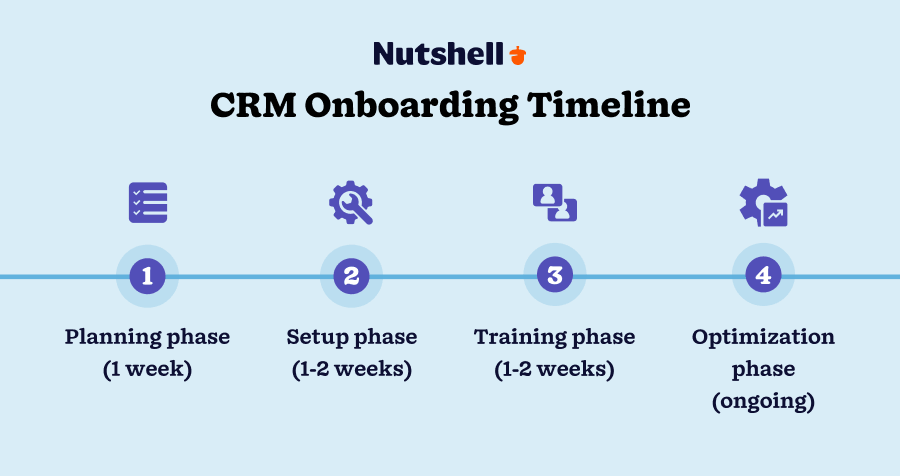
Proficiency with a new CRM varies by role, prior experience, and software complexity. Typically, employees reach basic comfort with core features within two to eight weeks, while advanced proficiency can take three to six months or longer. Knowing these timelines helps you plan effective training and onboarding tailored to your team's needs and the CRM’s complexity.
How long does it usually take employees to get comfortable with a new CRM?
Most employees become comfortable using the basic functions of a new CRM—such as entering data, managing contacts, and running simple reports—within two to eight weeks. Achieving proficiency with advanced features like automation, custom reporting, or integrations usually takes three to six months or more.
The pace depends on the employee’s role. Salespeople who use the CRM daily to track leads and update opportunities tend to gain proficiency faster than marketing or support staff who may use the CRM less often or handle complex, specialized tasks. For example, a sales rep might feel confident with core functions after about a month, while a marketing analyst working with detailed campaign data may require several additional months to master the system fully.
It’s important to distinguish "comfortable enough to use" from "proficient." Comfortable use means completing daily tasks without constant help. Proficiency means leveraging advanced CRM features to improve efficiency, decision making, and insights.
What factors influence how quickly employees learn a CRM?
Several factors affect how fast employees learn a new CRM.
Prior CRM experience helps employees adapt faster since many systems share core concepts like contact management and sales pipelines.
The CRM’s complexity matters: a simple, intuitive system can be mastered more quickly than one with extensive features and customization options. For example, teams moving from spreadsheets to a basic CRM often learn it rapidly, while enterprise systems require more time.
Training quality is critical. Interactive sessions and clear documentation speed learning, whereas inconsistent or self-paced training may slow it down.
User motivation also plays a role. Employees who see clear benefits and receive ongoing support tend to engage more fully and learn faster.
Finally, continuous support after initial training—like access to internal experts or vendor help desks—helps employees solve problems quickly, reducing frustration and accelerating proficiency.
Why do some managers underestimate or overestimate CRM learning times?
Managers often misjudge CRM learning timelines by assuming all users learn at the same speed or underestimating the system’s complexity. Treating CRM adoption as a one-time event rather than an ongoing process with reinforcement can lead to unrealistic expectations.
Some expect full proficiency immediately after initial training, not accounting for the time needed to practice new skills in real situations. Others overestimate the time required, delaying rollout and losing momentum.
Overlooking differences in user roles and technical comfort can cause problems. Using a single training schedule for all may leave some behind and others waiting unnecessarily.
Managers may also neglect follow-up support and refresher training, which are essential to move beyond basic familiarity to true proficiency.
How can managers customize training schedules to fit their team’s needs?
Start by assessing your team’s current CRM skills and experience to identify who needs foundational training and who can progress faster.
Match training formats to your team's learning preferences and availability. Some may prefer live workshops or webinars; others might benefit from self-paced tutorials or one-on-one coaching.
Pace training so employees can absorb and practice each topic before moving on. For example, focus first on core contact and deal management, then introduce reporting and automation.
Provide plenty of hands-on practice during and after training. Exercises reflecting daily tasks help solidify learning.
Group employees by role or proficiency when possible. Sales teams might need more training on pipeline management, while customer service reps focus on different CRM features.
Be flexible and adjust the plan based on feedback and observed challenges. Regular check-ins help identify who needs extra support or accelerated content.
What practical steps help track and boost employees’ CRM proficiency?
- Set clear proficiency milestones aligned with CRM functions and team roles, like completing tasks without help or using advanced features regularly.
- Use CRM analytics or third-party tools to monitor usage patterns and identify engagement levels.
- Hold regular feedback sessions where employees can share challenges and successes, allowing you to adjust training.
- Encourage peer mentoring by pairing less experienced users with CRM-savvy colleagues.
- Offer refresher courses or workshops periodically to reinforce skills and introduce updates.
- Recognize progress and proficiency milestones to motivate continued learning.
- Update training materials and schedules based on data and feedback to address common difficulties and knowledge gaps.
Conclusion
Planning CRM training with realistic timelines and understanding your team’s needs leads to smoother adoption. By accounting for different roles, prior experience, and providing ongoing support, you can guide employees toward true proficiency without unnecessary delays or frustration.
Frequently Asked Questions
How long does it take for salespeople to become proficient with a new CRM?
Salespeople usually reach basic proficiency within a month since they use the CRM daily. Mastering advanced features can take three to six months depending on the CRM’s complexity.
Can prior CRM experience significantly speed up learning?
Yes, employees familiar with other CRM platforms adapt faster because they already understand core concepts and navigation.
Is initial training enough for CRM proficiency?
No, ongoing practice, support, and refresher training are necessary to move beyond basic use to full proficiency.
How can I tell if my team is struggling with the CRM?
Signs include low usage rates, frequent help requests, or errors in data entry. Regular check-ins and usage reports help spot these issues early.